Make a good photo great by using one of my all time favorite apps: Color Thief. This app "steals" the color from another photo (or even a web page) and applies it to the one you choose. That does not sound as freaky cool as the app really is! You have to try it. And I can't believe that you won't be as addicted to it as I am!
Here is an example of a photo I took on the beach in Ventura, CA. Now, I like this photo as is. I LOVE it in its new color permutations. Check this out.
The starfish was lovely in its imperfection, one shortened arm, twirling in the sand. All I did to the original was to optimize it in Snapseed (tune image and details.)
Then I brought it into Color Thief and started zipping through the pix on my Camera Roll (this is a highly addictive part of the process. Like slot machine wheels going past, adding color instead of coins.) These were my favorites.
My all time favorite of the starfish color renditions was this one, which I posted on social media sites. I called it Pirouette.
And now I find out that they have an app for the Mac - oh joy, oh rapture. I'm heading for the app store right now. Oh, and did I mention that of course, it saves full resolution? It doesn't get any better than this.
Showing posts with label iPhone photos. Show all posts
Monday, February 17, 2014
Wednesday, August 24, 2011
iPhone Art Gallery
An exultation of photos are featured in this gallery by some of iPhone Diva's favorite contributors. These iphoneographs blew my socks off! OK, I wasn't wearing socks, but if I had been, they'd be history.
Jack Davis sent this lovely photo of "just a feather found on my lawn". The apps are a mystery, but knowing Jack, he probably used every app in the app store and a few he made up himself.
Bob Wright puts his own special spin on this photo using Pixel Blend app after the last iPhone Diva post. Way to go, Bob!
Judy Norton has this to say about her vintage garden shot: "Photoforge just updated to Photoforge2 and I love it! It has many of the elements of the original, plus a simulated Hipstamatic right inside the app with many film, lens, flash changes. I think I can entertain myself for days just with this app! This was originally a color pic from a garden in a community near here. I made many versions, but I like this one." I do too.
Robin Robertis immortalizes the spirit of our late friend, photographer and trickster, Jack Palmer, in this art photo. She apped it with Autopainter and Pixel Blend. We miss you, Jack.
Jack Davis sent this lovely photo of "just a feather found on my lawn". The apps are a mystery, but knowing Jack, he probably used every app in the app store and a few he made up himself.
Bob Wright puts his own special spin on this photo using Pixel Blend app after the last iPhone Diva post. Way to go, Bob!
Judy Norton has this to say about her vintage garden shot: "Photoforge just updated to Photoforge2 and I love it! It has many of the elements of the original, plus a simulated Hipstamatic right inside the app with many film, lens, flash changes. I think I can entertain myself for days just with this app! This was originally a color pic from a garden in a community near here. I made many versions, but I like this one." I do too.
Robin Robertis immortalizes the spirit of our late friend, photographer and trickster, Jack Palmer, in this art photo. She apped it with Autopainter and Pixel Blend. We miss you, Jack.
Friday, August 19, 2011
Fab New App - Pixel Blend
There is a fantastic new app out for the iPad (and coming soon for the iPhone) that I am so excited about. Back in the day, hubby Dewitt and I loved the Polaroid emulsion manipulation process with Time Zero/SX70 film and cameras. Basically, we'd use crochet hooks and other tools to "smoosh" the emulsion around before it hardened to create a painterly effect. There is a new Time Zero film out now and you could conceivably still do this process in its pure form.
Dewitt and I are hopelessly (hopefully?) digital these days and have tried a variety of apps to try to recreate the "smooshing" process we loved so. And were mostly unsuccessful. Until now.
Pixel Blend is an app whereby you can "smoosh" and manipulate your digital "emulsion". And there is a variety of tools to create painterly effects like the crochet hook, dental tool, and more. The old SX-70 emulsion moved more when it was warm or hot. And the creator of Pixel Blend, Michael Valdez, has included temperature choices so you can choose a more movable emulsion.
And if you have no idea what Time Zero, SX-70, or Polaroid emulsion manipulation are? No worries! Just think of this as the coolest app for painting your photos into impressionist works. Check it out here: Pixel Blend app.
I love shooting feminine window displays - I'm sure there's some deep psychological reason or maybe not. Maybe I just think they look pretty. At any rate, here is one of my SX-70 emulsion "smooshes" of a hatbox and pearls in a window. I think I shot it at Epcot Center in Orlando when our kids were little.
Fast forward about 15-20 years, and I shot this mannequin detail in a Seattle wedding boutique window.
I just finished "smooshing" this one with Pixel Blend. Oh yes, did I mention that you have a lot more control with the app than we did with the film? I can't wait to play with this app much, much more. Give it a try and send me your pix for posting. Happy smooshing!
Dewitt and I are hopelessly (hopefully?) digital these days and have tried a variety of apps to try to recreate the "smooshing" process we loved so. And were mostly unsuccessful. Until now.
Pixel Blend is an app whereby you can "smoosh" and manipulate your digital "emulsion". And there is a variety of tools to create painterly effects like the crochet hook, dental tool, and more. The old SX-70 emulsion moved more when it was warm or hot. And the creator of Pixel Blend, Michael Valdez, has included temperature choices so you can choose a more movable emulsion.
And if you have no idea what Time Zero, SX-70, or Polaroid emulsion manipulation are? No worries! Just think of this as the coolest app for painting your photos into impressionist works. Check it out here: Pixel Blend app.
I love shooting feminine window displays - I'm sure there's some deep psychological reason or maybe not. Maybe I just think they look pretty. At any rate, here is one of my SX-70 emulsion "smooshes" of a hatbox and pearls in a window. I think I shot it at Epcot Center in Orlando when our kids were little.
Fast forward about 15-20 years, and I shot this mannequin detail in a Seattle wedding boutique window.
I just finished "smooshing" this one with Pixel Blend. Oh yes, did I mention that you have a lot more control with the app than we did with the film? I can't wait to play with this app much, much more. Give it a try and send me your pix for posting. Happy smooshing!
Sunday, March 6, 2011
iPhoneography to the Max
Okay, photo friends, iPhone Diva is back. I went on retreat for a couple of months, but my little phone/camera has been smokin'! I got invited to join a group of extremely talented iPhone (and all camera) photographers and my creativity has gotten a real infusion. Kind of like getting a drink of water from a fire hose.
Now I'm ready to share some of that inspiration - and to share the websites and blogs of these amazing professionals who teach iPhone photo art workshops as well as normal photo workshops. And of course, there'll be amazing new apps to showcase!
A lot of my new photo pals are very versed in an app called Hipstamatic. (Brian Kavanaugh Jones has been our afficionado on iPhone Diva - check out earlier posts for some of his amazing work.) Hipstamatic has a number of optional film/lens combos that you can buy from within the app for extra versatility. And you can mix and match film choice, lens choice, and flash if you like. When I discovered that, I bought my new favorite combo called Salvador and Dreamcanvas (referring to surrealist Salvador Dali.) Here are my very first shots taken with the combo looking down from a Waikiki highrise to the lagoon below. I love the look here.

Now I'm ready to share some of that inspiration - and to share the websites and blogs of these amazing professionals who teach iPhone photo art workshops as well as normal photo workshops. And of course, there'll be amazing new apps to showcase!
A lot of my new photo pals are very versed in an app called Hipstamatic. (Brian Kavanaugh Jones has been our afficionado on iPhone Diva - check out earlier posts for some of his amazing work.) Hipstamatic has a number of optional film/lens combos that you can buy from within the app for extra versatility. And you can mix and match film choice, lens choice, and flash if you like. When I discovered that, I bought my new favorite combo called Salvador and Dreamcanvas (referring to surrealist Salvador Dali.) Here are my very first shots taken with the combo looking down from a Waikiki highrise to the lagoon below. I love the look here.
Thursday, December 2, 2010
Agave Dreams
I love agave plants. And not just because some of them are responsible for tequila. I love their beauty, their form, and their succulence. And I love having them in the garden as subjects for photography and celebration. The other day I worked an iPhone photo of one plant with some of my favorite apps.
This one I believe was worked in Tiffen Cool FX app.
As was this one.
I got the texture from IRIS. If you don't have this app, drop everything right now and get it. You won't be sorry.
Then I did some color adjustments in some app, forget which one, and did the three photos in an app called Diptic - another must have.
Variation on a theme with differnt color - deeper saturation.
Finally added text and border effect in FotoMuse.
This one I believe was worked in Tiffen Cool FX app.
Thursday, November 18, 2010
Sunset with the iPhone
Sunday, October 31, 2010
Head In The Clouds and iPhone Too
Friday, August 20, 2010
Jack Davis Says: Ya Gotta See This
My dear friend and reknowned Photoshop guru Jack Davis, author of the Photoshop Wow books and all kinds of DVD's and cool stuff has graciously contributed some iPhone pix for our viewing pleasure. The app featured below is called aptly enough "Ya Gotta See This". Sadly, it only works on the iPhone 4, so those of us who are anxiously awaiting the end of our contracts will suffer delayed gratification. Those who have the new phone will likely want to download it immediately.
Recently, Jack was teaching a workshop near Los Osos, California, which is close to San Simeon and Hearst Castle. I guarantee you've never seen Hearst Castle quite like this. Enjoy!


Recently, Jack was teaching a workshop near Los Osos, California, which is close to San Simeon and Hearst Castle. I guarantee you've never seen Hearst Castle quite like this. Enjoy!


Friday, August 13, 2010
Going for my Collage Degree
The iPhone Diva is hooked on collaging. Here are some random collages using either Collage or Montage to combine a series of images, or the same image resized over and over. Other apps used to enhance the final image are listed with each photo.
Picmix was used to layer color and black and white image and repaint the color back in in this shot combining prismatic view of Mono Lake tufas with a butterfly. Don't ask why, I just felt like it.
This is one of my favorite trees. I photograph it over and over. (It's on Papohaku Beach on the island of Molokai). Each tree image was worked in a number of apps, including Vihgo, Camera Bag, and Photogene. There may be others I can't remember.

At last, a simple one. Various rose images, turned black and white with tiffen's photofx. The sepia tone and edges are from the Burnt Paper filter in Art Camera app.

A multitude of butterflies, some inverted in Art Camera. Final touch was the Picasso filter in Art Camera app. That's my story and I'm sticking to it.
Picmix was used to layer color and black and white image and repaint the color back in in this shot combining prismatic view of Mono Lake tufas with a butterfly. Don't ask why, I just felt like it.
At last, a simple one. Various rose images, turned black and white with tiffen's photofx. The sepia tone and edges are from the Burnt Paper filter in Art Camera app.
A multitude of butterflies, some inverted in Art Camera. Final touch was the Picasso filter in Art Camera app. That's my story and I'm sticking to it.
Wednesday, July 21, 2010
Paris Re View
Wednesday, June 2, 2010
Cannes Do Photography, iPhone Style
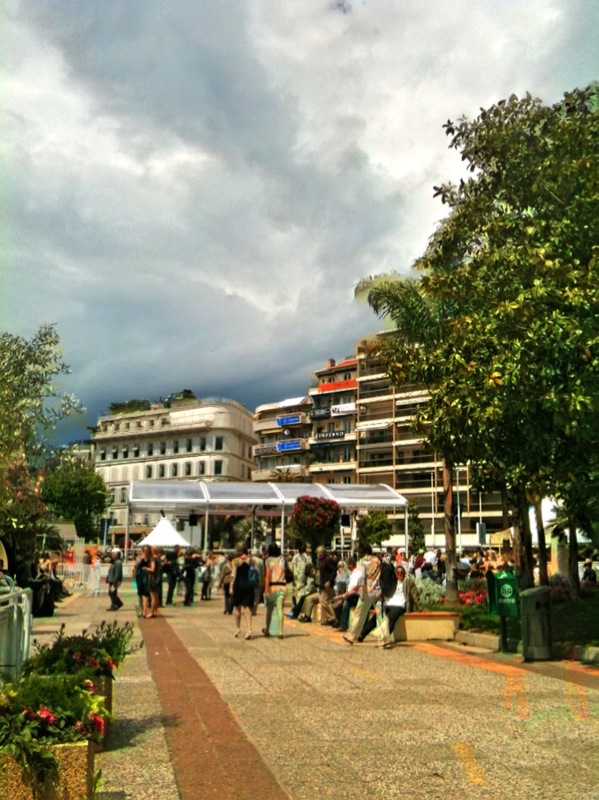
Brian Kavanaugh Jones attended the Cannes film festival in the South of France recently. (Yes, it was work!) He did have a chance to snap and work some iPhone shots. The four waterfront views are the same view worked with various apps - see if you can guess which apps he used - all of them have been featured here on iPhone Diva at one time or another. I like all four permutations.


These final three photos are unique Cannes moments. Enjoy.


These final three photos are unique Cannes moments. Enjoy.


Subscribe to:
Posts (Atom)