Wednesday, March 6, 2013

Guest Gallery iPhone Art

Here are a couple of great shots by iPhone Diva contributors Diane Rupnow and Judy Norton. Enjoy!

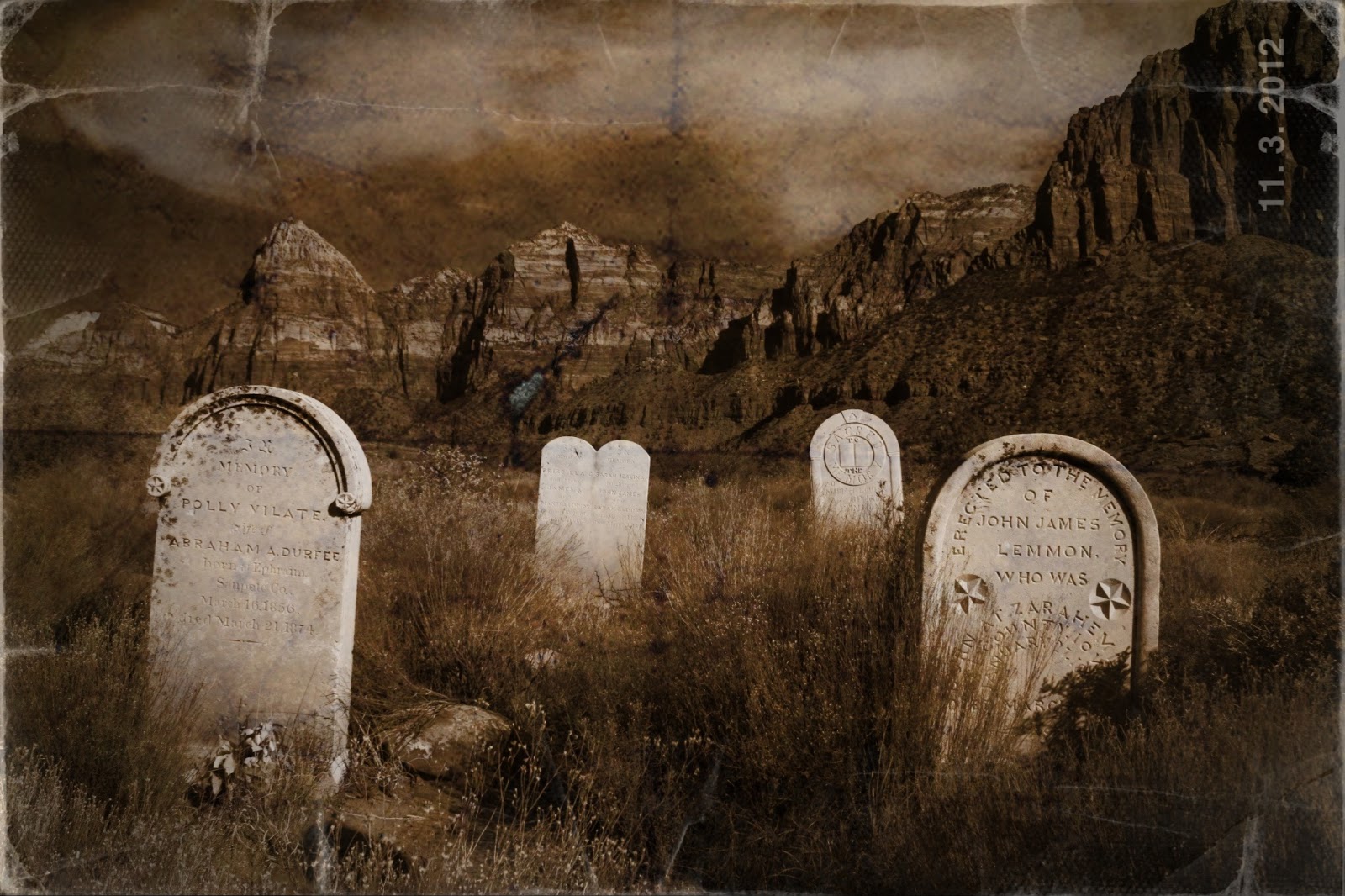
Diane shares: " I just had to share this recent image. I took this with my big girl camera in the town of Springdale, Utah, just outside Zion National Park. It was a nice image initially, but I used a couple of apps to bring the feeling that this was taken at the time this little cemetery was new,and then carried around in someone's pack for a few generations. Apps used: Iris, Picture Show."


And Judy writes, "There's one for you. I've been playing around with KitCam and love love love it! You can do multiple images as we used to do w Big Girl cameras, plus you can control the exposure of each image. Also, it has changes of film and lenses, plus a spirit level for straight horizons. It also takes video but I haven't tried that yet. Hope u like it! This image is 3 different azalea bushes taken as multiple exposure."

Saturday, February 23, 2013

My Own Private Paris

It can be challenging to find  new views of places that have been photographed so much. Even more so with iPhoneography where you have a single focal length and fixed aperture (unless you app it to approximate a larger one). So I'm always thrilled when I can take a photo that I've not seen before of a popular destination. Here are three views of my last trip to Paris that fit the bill.

The Peace Wall was shattered on one side and had not been fixed. It seemed a poignant frame for the Eiffel Tower. Apps: Camera+, Snapseed.


A rainy afternoon in the Latin Quarter seemed a busy colorful blur, so I used Slow Shutter app to capture the feeling. Optimized with Snapseed.

The Mona Lisa in the Louvre in the process of being captured by a Smart Phone. I like the blend of old and new image making. Apps: Camera+, Touch Retouch to remove distracting details like an arm coming in the left side.


Wednesday, February 20, 2013

Simply B and W Has a New Home

Good news, iphoneographers! Simply Band W has found a new home with app developer FotoSyn, the folks who brought us Bleach Bypass and Gelo. I am so happy!

Here's the press release from developer Jim Moore: 

Simply B and W will be joining the Fotosyn stable of apps.  A few weeks ago, Brian Kennedy of Mr B Ware, author of Simply B and W began discussions with myself about looking after and taking on the presence of Simply B and W in the App Store. As that handover will soon be complete with the app reappearing in the next week or so I wanted to let you know what was happening and where we’ll be going in the next few months with the app.

First of all… Simply B andW is one of the stalwart apps in the App Store. It’s hugely respected for its simplicity and effectiveness. That’s something I too very much believe in what apps should do -  a set number of tasks but doing them well. Simply B and W definitely has an enviable reputation in the App Store and it is something that I will do my best to keep up as the app develops over time. One of the most important things I wanted to put across first off is that the app will remain free. Free download, and free without any in-app purchases or advertising. The app, in it’s current form, fully free, will form the basis of going forwards. This is in keeping with the generous spirit of Brian who has selflessly handed the code over to me lock stock without looking for any financial gain. I respect this standpoint very much and I hope to continue with the development of Simply Band W in this spirit.

The app itself will relaunch, unchanged but will allow the app to progress and its user base to re-enter the update cycle, initially from maintenance mode in the initial months to an app that will keep up to date with the developments of iOS and the iPhone and iPad family. Initially I would see updates allowing for the larger sizes of the iPhone 5, possibly an iPad version as well as other tweaks including geolocation within EXIF data. From there, and as I shape the other apps I have (Bleach Bypass and Geló) I will draw on what works – allowing for easy workflow updates and enhancements to the UI, so that all three offer a unified user experience with the focus on taking pictures and editing them straight on your phone/tablet.

To say I am delighted to have been chosen to look after Simply Band W is an understatement. My passion has always been photography and image processing, so to be given the opportunity help others develop their photography through apps, and now with Simply B and W will be a great source of pleasure for me in the coming years.

I will be supporting Simply Band W with updates in line with my other apps; launching an app site to showcase the app as well as writing tutorials specifically related to Black and White photography which will appear on the newly (relaunched) Fotosyn website in the coming weeks. I am also entering into discussions with a world-class landscape photographer about writing some tutorials which will form the basis of inspiration in using this great app. This is in early stage but it is someone with whom I have worked extensively with in the past.

 If you require further information please contact me on this address info@fotosyn.com or on mobile 07714 214117. I am also available for Skype on jimmoorephoto.
Many Thanks and Best Regards… Jim

Fotosyn is a small independent developer of iPhone apps based in Glasgow, Scotland, UK. Started by Jim Moore in 2010; the stable includes Bleach Bypass and the recently launched colour tinting app Geló. Simply Band W makes up the third app in the range.

Note: This app is Simply B ampersand W - unfortunately Blogger does not allow ampersands in a post.  So I have written the word and in its place. Sigh.


Sunday, January 6, 2013

Simply B&W is Looking For A New Home


Free to good home. Wonderful iPhone app with proven track record and many fans wishes to be adopted by geeky computer guy or gal who also is interested in photography. Creator is moving to new job and must find a new domicile for me. Please email him (Brian Kennedy) here: - support@mrbware.com  Thank you. I promise to be loyal and a boon for all who use me.

Yes, it's true, photo pals. Simply B&W - one of iPhone Diva's all time favorite apps and my main B&W app is looking for someone to take over. Developer Brian Kennedy is closing his app shop as his new job will not allow him time to continue. After he announced his decision, the outpouring of "love" for Simply B&W fueled his decision to pass it on. Rather than selling this app, he is looking to give it away to a lucky developer.

Here's what and who he is looking for, in his own words:

"Update - 1/5/2013
I'd like to thank everyone for all the kind words since I first posted this message. I'm especially grateful for all of the messages I've seen that would like to see Simply B&W continue in the future. I was recently contacted by a developer who wanted to buy the source to Simply B&W but I've actually decided I'd rather give it away. My ideal candidate is a computer science student who develops iOS apps on the side and is into photography but unfortunately I don't know anyone that meets that criteria. If you're interested please email me at support@mrbware.com with the following details:

A brief bio/background about yourself
A link to any existing apps you've developed
A brief description of why you'd like to take over the app
A link to your photography (Flickr, Instagram, etc...)

I should also mention that I have no hard criteria on who I'll consider. If you're interested and you aren't in school that's ok too, so please apply. Your bio and the reason that you'd like to take over the app are my biggest factors in judging the pool of candidates. I'll collect candidates until Wed 1/9 and then try to make my decision by next Friday 1/11.

Thanks again,
Brian

Please email Brian if you have any desire to give this wonderful app a home. I admit to selfishly wanting it to stick around. Yes, it is possible to do decent black and white conversion in Snapseed and others. But my heart belongs to Simply B&W. Photo above is of Kapuaiwa Palm grove in Moloka`i - apped with Simply B&W. Of course.


Thursday, January 3, 2013

Simply Honolulu With an iPhone and Simply HDR App

One of my favorite apps is Simply HDR by the talented and prolific Jixipix gang. For you photoshop aficionados, its effects remind me of the plugin Lucis Pro. I love the crunchy, hyped look for certain subjects, particularly for architecture and street photography. Recently, I visited Honolulu with gal pal Theresa. We were there on business, but we still found time to pull out our iPhones as we walked Waikiki Beach. I knew even as I took these shots that I'd want to use Simply HDR.

 High rise tower with palms with sun reflecting off the many glass panes.


I loved this man's body language and elegant aloha shirt.


A Waikiki beach boy cleaned up chaise longs as the tourists headed off to dinner.


Sunday, November 18, 2012

iPhone Diva Lynette Sheppard’s 10 Must Have Apps


I've been asked by beginning iPhoneographers and professionals alike for a list of my fave apps. The problem, as I always tell them, is that I switch preferences day to day. My favorites are usually the one(s) I've just used. I'm not fickle - I just fall in love with new apps and/or old standbys on a moment to moment basis. However, if you could only have 10 apps (how crazy is that?), these are the ones I think you should start with:

Perfectly Clear        Best 1 stop shop to fix pix, superior noise removal

Snapseed                The baby photoshop - best optimizer by far

FXPhoto Studio        Special FX including frames

Pic Grunger              Vintage and grunge effects

Autostitch                Panoramic - best

Pro HDR                    Can shoot and do HDR or process from library

TouchRetouch           Content aware healing, removal unwanted objects

Simply BW                Absolute best B and W app - like a teeny Ansel Adams living in your phone

Autopainter              Cool painting app

Blender                    Great app for combining images

This will keep a photographer busy for years. And likely whet your app-etite for more.

The photo today showcases ProHDR and TouchRetouch in particular. When I drove past this Moloka`i Hawai`i church with the great Jesus Coming Soon sign, I stopped and took the photo in Pro HDR. This app combines a darker image exposed for the sky with a lighter image that opens up the church.

I then exaggerated the HDR with Simply HDR. (You could do a similar effect in Snapseed, using the Drama filters.)

I love how the image pops now, but those pesky telephone wires were bothering me. I took the image into TouchRetouch and erased them. Often TouchRetouch will easily remove an object or shadow within moments. This was quite a bit trickier, especially on the face of the building and took me a painstaking 20 minutes. But it worked, I'm happy with the final frame. I did all the processing on my phone (my iPad was home.)

FYI, the free version of TouchRetouch has a watermark on each image, so you'll want the one where you have to pay a whopping 99 cents. So so worth it!

Note: if you look closely, you might see the auntie sitting on a bench to the left of the church.
Tuesday, October 16, 2012

Grand iPhone Photo Art in the Grand Canyon

Beautiful Saddle Canyon has some of the most sublime reflections in the Grand Canyon. Pro HDR, Snapseed. That's all folks.

The iPhone does a great job of focusing close-up. This sacred datura blossom fills the frame in the foreground leaving the background of the river and canyon to go soft.
Pro HDR, Snapseed. I also did a version without the bug, using Touch Retouch.
OK, enough of the straight shots of beauty. Here is a "painting" of a wooden dory, the glorious and elegant craft we travel down the Colorado. Effect was created by using Slow Shutter Cam.
And now for the labor intensive art. Did a watercolor painting (as in did all the brush strokes with my finger on the iPad) with PhotoViva app. I prefer doing the strokes myself when I can, rather than letting Painteresque or Autopainter do it all. Did a color sketch with Snap and Sketch app and combined the two in IRIS app. Finally, added a little extra texture in IRIS. Took about 45 minutes. I love the process as much as the final frame.