Thursday, May 16, 2013

Haunting Beauty on Kalaupapa Peninsula, Moloka`i

One of the most beautiful, heart wrenching places on Earth is Kalaupapa peninsula, Moloka`i, Hawai`i where people with Hansen's disease (leprosy) were exiled, until a cure was finally discovered. We were blessed to be hosted by dear friends for a couple of days to immerse ourselves. Here are a few iPhone memories.

Beach Leaves       Apps: Snapseed, Camera +, Camera Awesome

The visitor area where patients and family members were separated, unable to touch.
Apps:   Snapseed, Camera +, Camera Awesome

Early morning on the peninsula.   Apps: Autostitch, ProHDR, Photoforge

Cottage and Graves    Apps: Snapseed, Camera +, Pixlromatic

Friday, May 3, 2013

Abstract Expressionism iPhone Style

One of my favorite photographers has begun using her iphone in a most creative way. I love the Abstract Expressionist school of painting and Katrina Pruett's latest work reminds me of that.

For apps, here's what she used. Snapseed, Touch Retouch to eliminate scratches, ProHDR and Photogene for framing.  On photo #3, she used Glaze for texture.   Enjoy!


With this art experiment, she went all out. She used a collage app, among her usual favorites. Can you guess which one? Which collage app is your favorite?

Thursday, April 18, 2013

Big Fun on the Big Island of Hawaii

Dewitt and I just had an amazing day with fun folks from Penn Mutual at the Fairmont Orchid Mauna Lani on the Kohala Coast of Hawaii Island. We explored photography, mostly with the iphone all around the grounds of this lovely resort. Yes, more of us fell down the rabbit hole of iphoneography - so much creative art work happened in such a short period of time that I promised to reprise the apps we used (and mention a few that we didn't so here they are!)

Snapseed                This is what I call the baby photoshop - the best photo optimizer by far. It also has some intriguing special effects like grunge, drama, and frames. It's robust so to get the most out of it, tap the question mark in the upper right to get help and links to instructional videos online. I always say, if you can only have one app, this is the one! And it's free!!!! The above photo of palm tree and gazebo roof was optimized in Snapseed and then zapped with the Drama filter in this same app.

FXPhoto Studio        Myriad special FX including frames. This app is easy, intuitive, and fun. There are so many effects that you could play forever with your existing photos and never finish. This great app is FREE today!

Pro HDR                    HDR stands for HIgh Dynamic Range and this app is a necessity for any iphoneographer. Anytime you have bright highlights and dark shadows (eg anytime you are shooting outdoors on a sunny day) you can get a photo that exposes for both areas, giving you a perfect photo that looks like what you see.  Set it on auto, hold it still while it analyzes and shoots 2 photos and then it will combine them into one. Save the result to your camera roll. Then app it with some other apps or just sit back and wait for compliments. The gazebo at sunrise below would have been a silhouette against the rising sun without ProHDR.


TouchRetouch           Want to get rid of power lines, annoying poles or trash in your photo? This is the go to app for content aware healing and removal of unwanted objects. Open your photo, use the little paint brush icon to select the part you want removed, and hit the go button (shaped like a little right arrow). Then just like magic, it's all fixed.

Autopainter              Cool painting app that is absolutely intuitive. Just use a photo from your camera roll, pick from a number of styles, and voila - amazing photo art. Works so well with plants and architecture. Two variations below with the laua`e fern and the palm tree (lithograph style).

Portrait Painter            This app is not just for portraits - in fact I never use it for people pix. It is fabulous for landscape and plants, birds. Like autopainter, it's an easy, one step app. Still you can also fine tune and adjust the effects. Great artistic app.


Blender                    Great app for combining images - very intuitive interface. Just import one and then another photo from your camera roll and it will put them together. It's like a double exposure or collage effect. After you choose two photos, you can also choose from a number of blend modes - go up to the two overlapping squares at the  top and it will bring them up. Try combining unlike images for a surreal effect. Terrific creative fun. The photo below was created with blender combining two shots of palm leaves and blend mode exclusion.

Other apps you might want to experiment with:

Simply BW                Absolute best B and W app - like a teeny Ansel Adams living in your phone.

Pic Grunger              Vintage and grunge effects - great if you are into that sort of thing - we are!

Autostitch                Panoramic - best. Can shoot panos from within the app or shoot with camera and combine later. It can handle lots of shots and big files.


Perfectly Clear        Best 1 stop shop to fix pix with no muss, no fuss, superior noise removal

This will keep a photographer busy for years. And likely whet your app-etite for more.

Wednesday, March 27, 2013

An iPhoneographer in Steinbeck Country: Monterey

The Monterey peninsula is a great place for iphoneographers. In January, Dewitt and I spent a couple of days wandering and shooting (and eating fresh fish!).

This first photo is of Monterey wharf. Apps used: ProHDR, Camera+, Aquarelle combined with Snap and Sketch version in IRIS for a painting with edge definition. Love the colors.

Along the 17 mile drive after sunset, we photographed the beach and kelp. Apps: Bracket Mode, ProHDR, HDR FX, Snapseed.

Rappa's at the end of Monterey wharf serves fresh fish with a breathtaking harbor view. Apps: Aquarelle, Pro HDR, Camera+, IRIS to combine painted image with original.

Sailboats and sailing gull in the marina at Monterey wharf.  Apps: ProHDR, Camera+, AHDR, Snapseed.

Wednesday, March 6, 2013

Guest Gallery iPhone Art

Here are a couple of great shots by iPhone Diva contributors Diane Rupnow and Judy Norton. Enjoy!

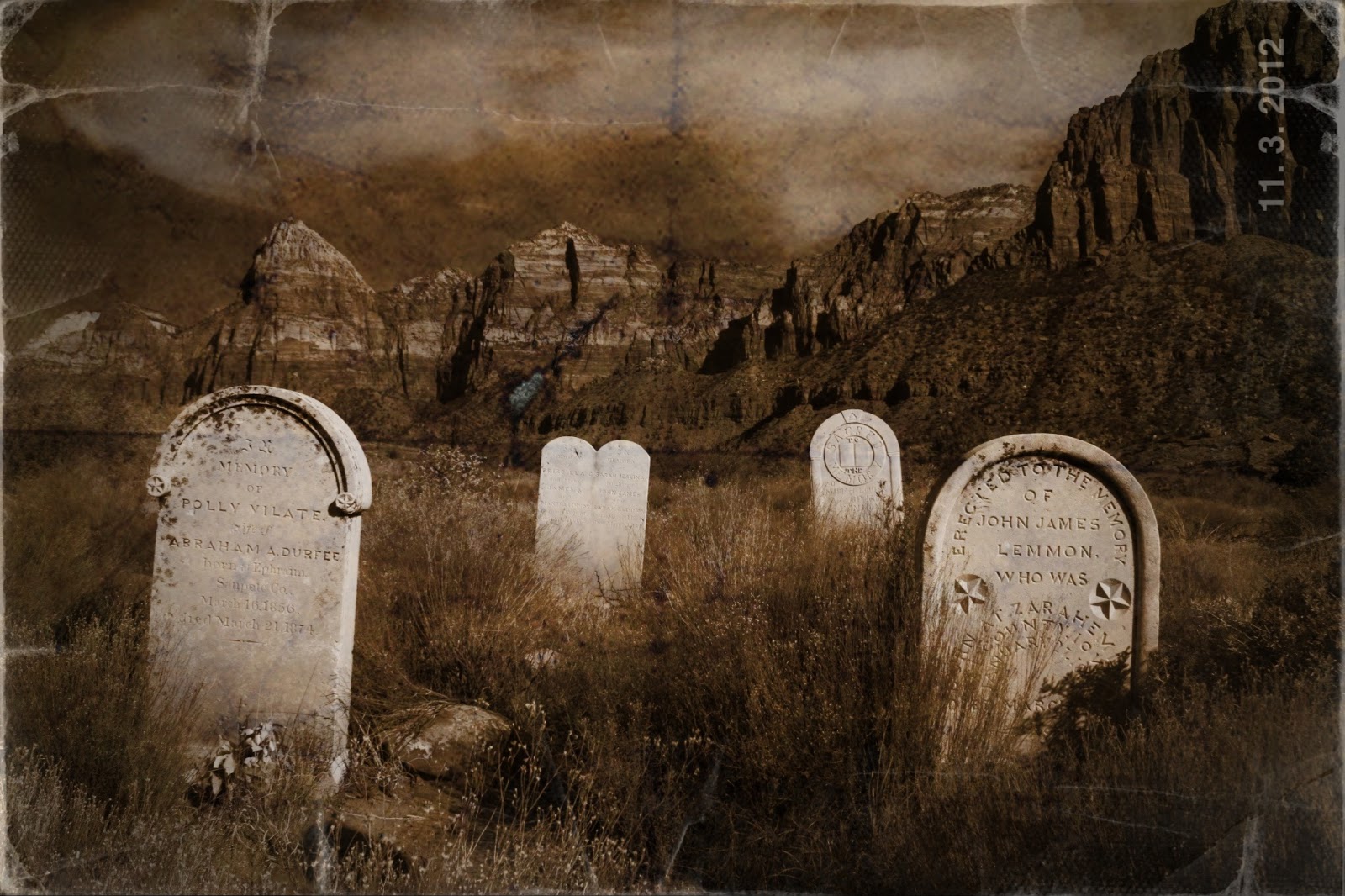
Diane shares: " I just had to share this recent image. I took this with my big girl camera in the town of Springdale, Utah, just outside Zion National Park. It was a nice image initially, but I used a couple of apps to bring the feeling that this was taken at the time this little cemetery was new,and then carried around in someone's pack for a few generations. Apps used: Iris, Picture Show."


And Judy writes, "There's one for you. I've been playing around with KitCam and love love love it! You can do multiple images as we used to do w Big Girl cameras, plus you can control the exposure of each image. Also, it has changes of film and lenses, plus a spirit level for straight horizons. It also takes video but I haven't tried that yet. Hope u like it! This image is 3 different azalea bushes taken as multiple exposure."

Saturday, February 23, 2013

My Own Private Paris

It can be challenging to find  new views of places that have been photographed so much. Even more so with iPhoneography where you have a single focal length and fixed aperture (unless you app it to approximate a larger one). So I'm always thrilled when I can take a photo that I've not seen before of a popular destination. Here are three views of my last trip to Paris that fit the bill.

The Peace Wall was shattered on one side and had not been fixed. It seemed a poignant frame for the Eiffel Tower. Apps: Camera+, Snapseed.


A rainy afternoon in the Latin Quarter seemed a busy colorful blur, so I used Slow Shutter app to capture the feeling. Optimized with Snapseed.

The Mona Lisa in the Louvre in the process of being captured by a Smart Phone. I like the blend of old and new image making. Apps: Camera+, Touch Retouch to remove distracting details like an arm coming in the left side.


Wednesday, February 20, 2013

Simply B and W Has a New Home

Good news, iphoneographers! Simply Band W has found a new home with app developer FotoSyn, the folks who brought us Bleach Bypass and Gelo. I am so happy!

Here's the press release from developer Jim Moore: 

Simply B and W will be joining the Fotosyn stable of apps.  A few weeks ago, Brian Kennedy of Mr B Ware, author of Simply B and W began discussions with myself about looking after and taking on the presence of Simply B and W in the App Store. As that handover will soon be complete with the app reappearing in the next week or so I wanted to let you know what was happening and where we’ll be going in the next few months with the app.

First of all… Simply B andW is one of the stalwart apps in the App Store. It’s hugely respected for its simplicity and effectiveness. That’s something I too very much believe in what apps should do -  a set number of tasks but doing them well. Simply B and W definitely has an enviable reputation in the App Store and it is something that I will do my best to keep up as the app develops over time. One of the most important things I wanted to put across first off is that the app will remain free. Free download, and free without any in-app purchases or advertising. The app, in it’s current form, fully free, will form the basis of going forwards. This is in keeping with the generous spirit of Brian who has selflessly handed the code over to me lock stock without looking for any financial gain. I respect this standpoint very much and I hope to continue with the development of Simply Band W in this spirit.

The app itself will relaunch, unchanged but will allow the app to progress and its user base to re-enter the update cycle, initially from maintenance mode in the initial months to an app that will keep up to date with the developments of iOS and the iPhone and iPad family. Initially I would see updates allowing for the larger sizes of the iPhone 5, possibly an iPad version as well as other tweaks including geolocation within EXIF data. From there, and as I shape the other apps I have (Bleach Bypass and Geló) I will draw on what works – allowing for easy workflow updates and enhancements to the UI, so that all three offer a unified user experience with the focus on taking pictures and editing them straight on your phone/tablet.

To say I am delighted to have been chosen to look after Simply Band W is an understatement. My passion has always been photography and image processing, so to be given the opportunity help others develop their photography through apps, and now with Simply B and W will be a great source of pleasure for me in the coming years.

I will be supporting Simply Band W with updates in line with my other apps; launching an app site to showcase the app as well as writing tutorials specifically related to Black and White photography which will appear on the newly (relaunched) Fotosyn website in the coming weeks. I am also entering into discussions with a world-class landscape photographer about writing some tutorials which will form the basis of inspiration in using this great app. This is in early stage but it is someone with whom I have worked extensively with in the past.

 If you require further information please contact me on this address info@fotosyn.com or on mobile 07714 214117. I am also available for Skype on jimmoorephoto.
Many Thanks and Best Regards… Jim

Fotosyn is a small independent developer of iPhone apps based in Glasgow, Scotland, UK. Started by Jim Moore in 2010; the stable includes Bleach Bypass and the recently launched colour tinting app Geló. Simply Band W makes up the third app in the range.

Note: This app is Simply B ampersand W - unfortunately Blogger does not allow ampersands in a post.  So I have written the word and in its place. Sigh.